Latest Post

Cannibal Return Mod Pack Android GTA SA Download

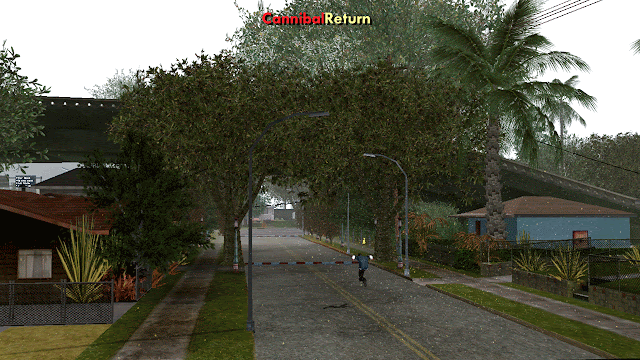
Most of the mod packs we see for Android have GTA V stuff in them. But what if you do not want GTA V stuff in your GTA SA Android including cars, textures etc? Today I am going to share another mod pack. This one is my personal favorite due to its graphics and optimizations. The name of this mod pack is "Cannibal Return". The maker of this mod pack are "Ryan Adriyan" and some other modders (name in the credits section). The main features of this mod pack are increased and optimized graphics, new textures, lots of trees and grass with highest quality textures and some cool mods including new hud, new skin, more trees, some new vehicles and some cool cleo mods including the famous SAA Extender mod. I tested this mod pack in an old Galaxy S4 and it ran on max settings without any lag. It is a very good mod pack. If you are bored with GTA V stuff then give this mod a try I am sure you will love this mod pack.


Credits:

HAF
Mike Kethens

To install this mod pack, please follow these steps:


Before You Start

• Make sure you have atleast 2GB free space to download and install this mod pack.
• As always, you need a good specs device to run this mod pack. 
• Cleo Android is required to get maximum results. Mods like SAA Extender require cleo to work.
• Always backup your game data and apk file before installing.
• If the mod pack is not working then delete the folder "mobile" present inside:
   /Android/data/com.rockstargames.gtasa/files/texdb/         <here>
  it will fix the crash. 
• To uninstall this mod pack, uninstall the moved files.


Step I: Download Cannibal Return Mod Pack SA Android

• Download from:
   Mediafire   {700MB

• Download Cleo Android:


  Download Cleo Android


Step II: Install this Mod in Your GTA SA Android

• Backup GTA San Andreas Android data files and save game files. If you don't want to backup, then skip next two steps. If you want to backup then copy data files. You can find data files and save files by going to:
   /Android/obb/com.rockstargames.gtasa/      <=== Copy the "com.rockstargames.gtasa" folder!
  And move it to any safe place. So if this mod don't work you can revert back to original game.
• Delete the "com.rockstargames.gtasa" folder present inside:
   /Android/data/         <here>
• Now extract the mod pack. You can use WinRar in computer and ES File Explorer in Android to extract the mod pack.
• After extraction go to the location where you extracted the mod pack and copy "com.rockstargames.gtasa" folder. And move it to:
  /Android/data/            <here>
• You have installed the mod pack.

Step III: Enjoy the mod pack

• Now run the game and enjoy the mod pack.
• Mod not working? Click Here to fix the Force Close error.

Screenshots:

Cannibal Return Mod Pack Android GTA SA


\Cannibal Return Mod Pack Android GTA SA screenshots gtaam


Cannibal Return Mod Pack Android GTA SA reflections max gta sa


Cannibal Return Mod Pack Android GTA SA best featured

Project Online v1.1b Mod Pack Android Download GTAAM

With release of GTA V (and Online) you should have seen tons of mods which add GTA V stuff in GTA San Andreas (including Android). You may have installed many of them but some work and some not. The reason may be anything from the game version (Mobile Version) to Android version. New mods are made regularly. Users like us (mobile users) who can not play GTA V on their phones want to install these mods. But due to some limitations, mobile modding is not as cool as it is in computers. So many users prefer installing a mod pack in their GTA San Andreas Android because they have lots of mods in them and they do not need computer to install them. Just move the files and the mod pack is installed. Today I am going to share a mod pack which will add lots of stuff from GTA Online. You should be asking whats the difference between GTA V and Online? Well there is not much difference but in GTA Online there are some new skins, new vehicles, new clothes and lots of other stuff with every new update (DLC). The maker of this mod pack is "Michael Mikhalev" and some other modders (name in the credits section). This mod pack contains lots of stuff from GTA Online including new vehicles, weapons, characters, new buildings, hud, GTA V Weapon Scrolling  and much more. The mod is great and looks really impressive due to its high quality textures, new timecyc and photo realistic vegetations. As always, this mod pack is for some high specs devices. And to get maximum results you should be running GTA San Andreas Android in high settings. This mod pack is in beta stage so you can expect some updates.

Credits:

Jerrad Skull
Jason Chew
GangSTAR TM
GTAmoddingFX ᵐᵒᵗᶤᵒᶰ ᵈᵉˢᶤᵍᶰ​
Automan
KINOman
To install this mod pack please follow these steps:\

Before You Start

• You need a good specifications device to run this mod pack.
• Take the backup of original apk of GTA San Andreas Mobile with APK Extractor app (free on Playstore).
• Backup your save game files and other mods etc. We are not responsible for deletion of your game data.
• To uninstall this mod pack, delete the moved files. 

Step I: Download Project Online v1.1b Mod Pack Android

• Download Mod Pack from:
   Mega     (952MB) 
   
    Click Here if you don't know how to download from Mega Links.


Step II: Install this Mod in Your GTA SA Android

• Backup GTA San Andreas Android data files and save game files. You can find data files and save files by going to:
   /Android/obb/com.rockstargames.gtasa/      <=== Copy the "com.rockstargames.gtasa" folder!
  And move it to any safe place. So if this mod don't work you can revert back to original game.
• Delete the "com.rockstargames.gtasa" folder present inside:
   /Android/data/         <here>
• Now move "com.rockstargames.gtasa" from the mod pack zip to:
   /Android/data/
• Install apk file present inside this mod pack.
• The mod is installed now.

Step III: Enjoy the mod pack

• Now run the game and enjoy the mod pack.

Screenshots:

Project Online v1.1b Mod Pack Android start menu modded android

Project Online v1.1b Mod Pack Android GTA V Style Weapons scroll mod gta sa android

Project Online v1.1b Mod Pack Android cars

Project Online v1.1b Mod Pack Android enb timecyc screenshots

Mitsubishi Lancer Evolution Car Mod Android

After lots of No Need Computer Mods here comes a heavy car mod from "RIZKY GAME". This car mod comes with custom paintjob thats why you need a computer. Because custom textures are not present in GTA San Andreas, so you have to add them seperately. The car has high quality textures both indoor and outdoor and looks like a sports car.  There are no bugs at this time. Do not forget to install "First Person While Driving Mod" with this car mod.
To install this mod please follow these steps:


Before You Start

• Computer is required to install this mod.
• To uninstall, delete the moved files.

Step I: Download Mitsubishi Lancer Evolution For Android

• Download Mod from:
  Google Drive

• Download Alci's IMG tool:
   Download IMG Tool

• Download  TXD Fucker:
   Download TXD Fucker


Step II: Install this Mod in Your GTA SA Android

• Extract your ".obb" file using winrar. (PC). Click Here if you do not know how to extract ".obb" files of GTA San Andreas Android.
• Open IMG Tool you downloaded in step one and open "gta3.img" file using it. Which can be found by going to:
   /(extracted obb)/texdb/gta3.img
• Find and replace the ".dff" model file in this zip by going to "Actions>>Replace if exists" option and then selecting the ".dff" files.
   then goto Commands>Rebuild Archive and then exit.
• Now run TXD Fucker and open this file with it:
  /(extracted obb)/texdb/gta3/gta3.txt
• Click on Import > with alpha and select all files inside "with alpha" folder.
• Click on Import > without alpha and select all files inside "without alpha" folder.
• Exit and Copy below file and folder:
   /(extracted obb)/texdb/gta3.img (this file)
   /(extracted obb)/texdb/gta3/ (this folder)
  and Paste them in your phone's:
  /Android/data/com.rockstargames.gtasa/files/texdb/             <here>
*Make new "files" and "texdb" folder if doesn't exist

Step III: Enjoy the mod

• Now run the game and enjoy the mod.

Screenshots:

Mitsubishi Lancer Evolution For Android by RIZKY GAME


Mitsubishi Lancer Evolution For Android

Hang Glider Jet Pack Mod Android Download GTAAM

A new glider mod for GTA San Andreas Android which will replace Jetpack with Glider. The maker of this mod is "AleksGTA" and it has been ported to GTA SA Android by "karl chester". The mod works fine and has no bugs. This is a heavy mod, means you need a computer to install this mod.
To install this mod please follow these steps:


Before You Start

• You need a computer to install this mod.
• To uninstall simply delete the moved files.

Step I: Download Hang Glider Jetpack Mod GTA SA Android

• Download mod from:
   Google Drive

• Download Alci's IMG tool:
   Download IMG Tool

• Download  TXD Fucker:
   Download TXD Fucker

Step II: Install this Mod in Your GTA SA Android

• Extract your ".obb" file using winrar. (PC). Click Here if you do not know how to extract ".obb" files of GTA San Andreas Android.
• First of all move the "anim" folder to:
  /Android/data/com.rockstargames.gtasa/files/           <here>
*Make new "files" folder if doesn't exist
• Open IMG Tool you downloaded in step one and open "gta3.img" file using it. Which can be found by going to:
   /(extracted obb)/texdb/gta3.img
• Find and replace the ".dff" model file in this zip by going to "Actions>>Replace if exists" option and then selecting the ".dff" files.
   then goto Commands>Rebuild Archive and then exit.
• Now run TXD Fucker and open this file with it:
  /(extracted obb)/texdb/gta3/gta3.txt
• Click on Import > with alpha and select all files inside "with alpha" folder.
• Exit and Copy below file and folder:
   /(extracted obb)/texdb/gta3.img (this file)
   /(extracted obb)/texdb/gta3/ (this folder)
  and Paste them in your phone's:
  /Android/data/com.rockstargames.gtasa/files/texdb/             <here>
*Make new "files" and "texdb" folder if doesn't exist

Step III: Enjoy the mod

• Run the game and enjoy the mod.

Screenshots:

Hang Glider Jetpack Mod Android screenshots


new Hang Glider Jetpack Mod Android

New Rim Pack for GTA SA Android by ducati and sigilohq

GTA San Andreas has some cool modifications for vehicles but due to low textures and low poly models those modifications look really bad. Similarly if you install rims in your cars you will notice that they have very low quality. Which makes your car look really bad. To fix this issue the modder "SigiloHQ" has ported a rim pack for GTA San Andreas Android. The maker of this mod is "Ducati996" and "SigiloHQ" has ported it for GTA SA Android. This new rim pack contains new rims for all vehicles including sports, classic, muscle and off road rims. The quality of rims is really high which when used with custom Car Mods make it really great. Another good thing about this mod is it supports "ENR Mod", which add supports for reflection in rims. There are 17 rims in this mod but if you don't like them you can add textures present inside "Texturas Alternativas" folder. Also note that this mod requires computer and cleo Android to install and work.
To install this mod please follow these steps:

*Make new "files" and "texdb" folder if doesn't exist


Before You Start

• Cleo Android is required to run this mod.
• Textures inside "Texturas Alternativas" folder are extra textures which should be added only if you do not like installed rims.
• There are two types of ".dff" files inside this mod pack. One is with ENR and one is without ENR. ENR is just a reflection mod (ultra reflections). So install any one ".dff" files!
• To uninstall, simply delete the moved files.


Step I: Download New Rim Pack Mod for GTA SA Android

• Download Mod from:
   Google Drive

• Download Alci's IMG tool:
   Download IMG Tool

• Download  TXD Fucker:
   Download TXD Fucker

• Download Cleo Android:


  Download Cleo Android


Step II: Install this Mod in Your GTA SA Android

• Extract the downloaded mod (zip file).
• Move the ".csi" and ".fxt" files to:
   /Android/data/com.rockstargames.gtasa/      <here>
• Now extract your ".obb" file using winrar. (PC). Click Here if you don't know how to extract "obb" files.
• Open IMG Tool you downloaded in step one and open "gta3.img" file using it. Which can be found by going to:
   /(extracted obb)/texdb/gta3.img
• Find and replace all the ".dff" model files in this zip by going to "Actions>>Replace if exists" option and then selecting the ".dff" files (inside "gta3.img" folder. Or if you want rims with reflections than go to "ENR" folder instead of "gta3.img" folder)
   then goto Commands>Rebuild Archive and then exit.
• Now run TXD Fucker and open this file with it:
  /(extracted obb)/texdb/gta3/gta3.txt
• Click on Import > without alpha and select all files inside "without alpha" folder.
• Exit and Copy below file and folder:
   /(extracted obb)/texdb/gta3.img (this file)
   /(extracted obb)/texdb/gta3/ (this folder)
  and Paste them in your phone's:
  /Android/data/com.rockstargames.gtasa/files/texdb/             <here>
*Make new "files" and "texdb" folder if doesn't exist

Step III: Enjoy the mod

• The mod is installed. Now run the game and enjoy new rims. And if you ever get bored with rims than add the textures inside "Texturas Alternativas" to "gta3.img". It will replace the rims with new rims.

Screenshots:

New Rim Pack for Android from gtaam


New Rim Pack for GTA San Andreas Android

ENR (ENB Reflections) Mod GTA SA Android

Even though if you max out car reflections you will notice that they are still low as compared to ENB mods of GTA San Andreas PC. To fix this issue you can install this cool reflections mod. The maker of this mod is "SigiloHQ". This mod will add ultra reflections in all cars in GTA San Andreas Android. Please note that this mod will add reflections to default cars of GTA San Andreas Android, it will not add ENR type reflections in custom car mods. This mod will also add reflections to some other things like traffic signals, custom car parts and other metallic things. The best thing about this mod is it does not require cleo or computer to install and work. Just move the files and the mod will work.
To install this mod please follow these steps:


Before You Start

• To install this mod you have to download two files. One from Mega link and other from Google Drive. The Mega link contains "gta3.img" file and Google Drive link contains already replaced texture which are required to make this mod work.
• This mod will work for default San Andreas cars only. Because every car model has to be edited to add support for this mod.
• To uninstall simply delete the moved files.


Step I: Download ENR Max Reflections ENB Mod Android

• Download Mod from:
   Mega
  Also download additional files from this link:
   Additional Files    (These files are required even if you have downloaded from above link)

• Download Alci's IMG tool:
   Download IMG Tool


Step II: Install this Mod in Your GTA SA Android

• Extract your the mod files,
• Move the "gta3.img" file to:
   /Android/data/com.rockstargames.gtasa/files/texdb/     <here>
  *Make new "files" and "texdb" folder if doesn't exist
• And move the "txd" folder (inside additional files zip) to:
  /Android/data/com.rockstargames.gtasa/files/texdb/     <here>

Step III: Enjoy the mod

• Now run the game and enjoy the mod. Make sure you are using stock cars after installing this mod. Or those car which have official support for ENR Mod.

Screenshots:

ENR (ENB Reflections) Mod GTA SA Android by sigilohq


max car reflections mod gta sa mobile

Object Spawner Mod GTA SA Android

Cleo mods are one of the best mods because of the features they provide. Here I am going to share another great cleo mod which will let you spawn some objects. The maker of this mod is "Mods android Cj El morenazo gta sa". This mod will let you spawn objects. Objects mean things like road blocks, watch towers, stairs etc. This mod is really useful. When used with "Play As Cop Mod" this mod can really help you and add a lot of reality in gameplay. Anyway, this mod is a cleo mod so make sure cleo Android is installed in your phone.


Before You Start

• Cleo Android is required to install this mod.
• You can spawn some objects in this version (useful).
• To delete the spawned objects choose "destroy all objects" option.
• After installing this mod open the cleo script menu and select Object Spawner Mod and choose the object you want from there.

Step I: Download Object Spawner Mod GTA SA Android

• Download Mod from:
   Google Drive

• Download Cleo Android:


  Download Cleo Android


Step II: Install this Mod in Your GTA SA Android

• Extract the mod.
• Move the ".csi" and "fxt" file to:
   /Android/data/com.rockstargames.gtasa/           <here>

Step III: Enjoy the mod

• Run the game and enjoy the mod.

Screenshots:

spawn buildings and sam gun gta sa android mod


road blocker mod gta san andreas android

Lamborghini Reventon Car dff Only Download

After lots of "dff" cars only here comes another "dff" only version of Lamborghini Reventon. When I say "dff only" it means that you can install this mod without using a computer. Yes everybody has a computer in this era but there are still some people who do not have a computer (no joke). The maker of this car mod is "nfsu" and "RIZKY GAME" has ported it for mobile users of GTA San Andreas. The car works fine and has no bug. This car mod will replace the Infernus car with Lamborghini Reventon. You can use any vehicle spawner mod like THIS to spawn this car any time.
To install this mod please follow these steps:


Before You Start

• If you don't have PC then you can install this mod with "img tool android" software (free in playstore).
• If you are using IMG TOOL Android to install this mod. You still need to extract data file (obb file) of GTA SA Android. You can use ES File Explorer or any other zip tool to extract it (can take time). Steps are same. CLICK HERE to know how to use img tool android to install this mod (no need pc).
• Don't know how to extract ".obb" files of GTA SA Android using PC? Click Here to watch a step by step tutorial by me.
• To uninstall simply delete the moved files.


Step I: Download Lamborghini Reventon DFF Only Car Mod

• Download this mod from:
   Google Drive

• Download IMG tool (Android)
  Download IMG Tool Android

• Download Alci's IMG tool:
   Download IMG Tool

Step II: Install this Mod in Your GTA SA Android

• If you don't have PC. You have to follow "img tool Android tutorial"! do not follow below steps!
And if you have PC you can follow these steps:
• Extract the downloaded mod (zip file).
• Now extract your ".obb" file using winrar. (PC).
• Open IMG Tool and open
   /(extracted obb)/texdb/gta3.img
• Find and replace the ".dff" model in this zip  and
   then goto Commands>Rebuild Archive and then exit.
• Now copy below file:
   /(extracted obb)/texdb/gta3.img (this file)
  and Paste it in your phone's:
  /Android/data/com.rockstargames.gtasa/files/texdb/             <here>
  *Make new "files" and "texdb" folder if doesn't exist

Step III: Enjoy the Mod

• Run the Game and enjoy the mod. 

Screenshots:

Lamborghini Reventon Car dff Only gameplay screenshots


Lamborghini Reventon Car dff Only best car gtaam

Ghost Rider Skin Mod GTA SA Android skin only mod android gtaam

After "Ghost Rider Mod Pack" here comes the Ghost Rider Skin for GTA San Andreas Android. This mod will only change the skin to Ghost Rider. Ghost Rider is the famous movie, you can read more about it in google and wikipedia. Anyway the skin is great, the only thing which is not present in this mod is the fire. According to the maker of this mod he had to remove the fire effect from the skin because it made the game laggy. The maker of this mod is "arshi678". This mod does not require cleo or computer. Just move the files and run the game.
To install this mod please follow these steps:


Before You Start

• If the game crashes or the skin is not working, please start a new game.
• To uninstall this mod please remove the moved files.

Step I: Download Ghost Rider Skin Mod GTA SA Android

• Download Mod:
  Download Mod

Step II: Install this Mod in Your GTA SA Android

• Extract the downloaded mod (zip file).
• Move the file "player.img" and folder "player" folder to:
  /Android/data/com.rockstargames.gtasa/files/        <here>
*Make new "files" folder if doesn't exist

Step III: Enjoy the mod

• Run the Game and enjoy the mod.

Screenshots:

Ghost Rider Skin Mod GTA SA Android download free

Collapsed Giant Red Bridge GTA SA Android broken san fierro las venturas bridge red big mod

Today I am sharing a very interesting mod with a very interesting story.  This mod changes the Gant bridge in San Fierro to the ''collapsed'' Giant bridge in San Fierro. The maker of this mod is "andlebb1998" for the PC version of GTA SA and this mod has been ported by "Los Santos Guy" to Android version. Here's what the author described about this mod "At 3pm this afternoon the Giant Bridge in San Fierro collapsed. About 40 cars fell into the deep water of the San Fierro Bay. 35 people drowned and 15 people are seriously injured. Researchers don't know what caused the collapse yet." It may be due to unknown reasons inside sea bed or whatever. The good thing about this mod is it does not require cleo or computer to work. Just move the files and run the game.
To install this mod please follow these steps:


Before You Start

• To uninstall this mod, please delete the moved files.

Step I: Download Collapsed Giant Red Bridge Mod Android

• Download this mod from:
   Google Drive

Step II: Install this Mod in Your GTA SA Android

• Extract the mod file. You can use ES File Explorer if you're on Android Phone and WinRar if you are using PC to install this mod.
• Move the ''maps'' folder to:
  /Android/data/com.rockstargames.gtasa/files/data/          <here>
  *Make new "files" and "texdb" folder if doesn't exist

Step III: Enjoy the Mod

• Now run the game and go to the bridge. The bridge will be collapsed.

Screenshots:

Collapsed Giant Red Bridge GTA SA Android gtaam screens best


Collapsed Giant Red Bridge GTA SA Android screenshots

Author Name

Formulir Kontak

Nama

Email *

Pesan *

Diberdayakan oleh Blogger.